If you’ve ever reached tax time thinking, “Wait… I drove a ton for work last year,” you already know how valuable a good mileage tracker can be. The IRS expects you to keep records (or provide strong supporting evidence), and mileage is one of the biggest deductions for self-employed people, gig workers, and small business owners. IRS Topic 510
One popular approach is using a plug-in mileage tracking device that automatically logs trips. That’s exactly what
GOFAR offers: an OBD2 device paired with an app to track trips, classify mileage, and export reports.
(We’ll break it down.)

But for most people—especially anyone who needs a clean mileage log fast, wants to avoid buying hardware, or needs to reconstruct mileage— ExpressMileage is often the simpler, more cost-effective option.
Quick takeaway: If you want “set it and forget it” always-on tracking with an OBD2 device, GOFAR is interesting. If you want a fast, web-based way to generate a compliant mileage log (especially for past periods), ExpressMileage is usually the better fit.
What is GOFAR and how does it track mileage?
GOFAR describes itself as a mileage tracker and logbook app that uses a leave-in plug-in device to capture every trip, then syncs those trips to your phone.
According to GOFAR, it uses OBD2 scanner technology (the same diagnostic port mechanics plug into) and sends your car’s data from the adapter to the GOFAR app. See How GOFAR works
The practical benefit is simple: because the device stays plugged in, GOFAR can automatically log drives even if your phone battery dies. (GOFAR mileage tracker) That “always on” approach can be great for people who never want to think about tracking again.
Why people like a plug-in mileage tracking device
A plug-in device is appealing because it reduces human error. You don’t have to remember to start tracking, stop tracking, or enter trips manually.
GOFAR also highlights features like automatic trip logging, seeing trips on a map, and exporting spreadsheet-style reports.
For someone who drives constantly (sales routes, real estate, rideshare, deliveries), the “capture everything” idea can sound perfect—
especially when you’re trying to maximize business miles and avoid missing deductions.
The big tradeoff: cost and commitment
Here’s the part most people don’t think about until after they’ve started: device-based tracking often comes with ongoing fees and up-front hardware cost.
GOFAR’s pricing page shows a $15/month plan plus $100 for the device, with discounted annual and 2-year options that include the device.
That may still be worth it if you’re a heavy driver and you truly want the “automatic all year” method.
But for many people, paying a subscription + buying hardware is more than they need—especially if they only need a mileage log for one tax year, a reimbursement request, or a specific time period.
When ExpressMileage is the better option for most people
ExpressMileage is different on purpose. Instead of requiring a plug-in device, ExpressMileage is a web-based mileage log generator designed to help you create
a mileage log in minutes—without installing anything in your vehicle.
How ExpressMileage works
1) You can generate a mileage log fast (even if you’re behind)
If you’re reading this because you didn’t track mileage consistently, device-based tracking won’t help you retroactively.
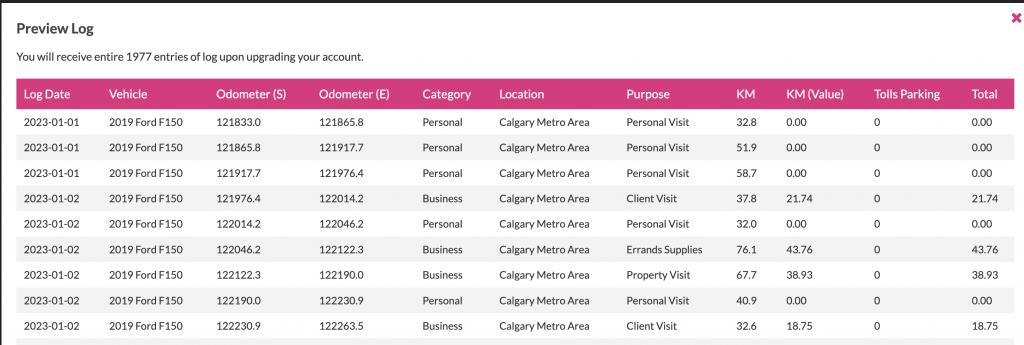
ExpressMileage is built for speed: you can create a driving log in minutes and produce a clean report for tax deduction or reimbursement use.
Generate a mileage log in 4 minutes
2) No hardware, no OBD2 port worries
GOFAR relies on an OBD2 diagnostic port (common in vehicles, but still something you’re physically plugging into your car).
ExpressMileage doesn’t require any device at all—meaning you don’t have to install hardware, check compatibility, or keep something plugged in.
For many people, “no device” is a big win.
3) Great for recurring drives and predictable routes
A lot of mileage is repetitive: commuting between office locations, weekly errands for supplies, recurring client visits, school drop-offs for business-related travel, etc.
ExpressMileage highlights the ability to auto-populate and create recurring drives, which is exactly what many people need to build a consistent log quickly.
ExpressMileage home
4) Built-in templates if you want to start simple
Some people don’t even want an app—they just want a clean spreadsheet or printable log template.
ExpressMileage provides free mileage log templates for Excel/PDF/Google Sheets, which is perfect if you’re easing into better recordkeeping.
Free mileage log templates
So… is GOFAR “bad”? Not at all.
GOFAR is a legitimate approach: a plug-in mileage tracking device + app can be very convenient for people who want always-on automation.
I
f you drive every day for work and you like the idea of a device logging trips automatically, it’s worth reviewing their product pages:
Mileage tracker, How it works, and Pricing.
The point is fit. Most people aren’t looking for a “FitBit for the car” with hardware and an ongoing subscription.
Most people want one thing: a clean, easy-to-export mileage log they can confidently use at tax time.
Recommendation: choose based on your real situation
- Choose GOFAR if you want always-on automatic tracking using an OBD2 plug-in device and you’re fine with a subscription + hardware cost.
- Choose ExpressMileage if you want a faster, simpler, web-based option—especially if you need a mileage log for a past period,
want recurring-drive support, or don’t want to buy/install a device.
Ready to create your mileage log now?
Start here: How ExpressMileage Works |
Watch: 4-minute mileage log demo |
Plans: ExpressMileage membership plans

Effortless. IRS Compliant. All in 5 Minutes.
- GENERATE A DRIVING LOG IN MINUTES
- AUTO-POPULATE AND RECURRING DRIVES
- GET YOUR MAXIMUM TAX DEDUCTION