A mileage log is a dated record of the business drives you make. For each trip it shows when you drove, where you went, why, and how far. If you claim the standard mileage deduction, the log is what backs up the number on your return.
This page gives you two free templates, an Excel and Google Sheets file and a printable PDF, plus the rules behind them. You will also find filled-in examples, the 2026 IRS rates with the math, and a plain description of how ExpressMileage builds a log for you. Every IRS point below is tied to a source at the bottom of the page.
The short version
- Record the date, the place, the business purpose and the miles for every business trip.
- Write it at or near the time of the trip. A log you keep weekly still counts as timely under IRS Publication 463.
- The 2026 business rate is 72.5 cents a mile through June 30 and 76 cents a mile from July 1.
- Commuting from home to your regular workplace is not business mileage.
- Amounts you estimate or approximate cannot be deducted. Record real trips only.
Free mileage log templates for 2026
Both files use the same columns, which follow the sample mileage and expense log in IRS Publication 463. Pick one, or use both: a printed sheet in the glovebox and a spreadsheet for the totals.
- Download the Excel and Google Sheets template (.xlsx). It has a Log tab with 500 rows, a Totals tab, and a Settings tab for the rates. It works out your miles from odometer readings, picks the right 2026 rate by trip date, and adds up business, personal and commute miles. To use it in Google Sheets, upload it to Google Drive and open it with Sheets.
- Download the printable PDF log. One page, 20 trips, with a column for every field in the table below. Print a stack and keep a pad in the car.
No sign-up is needed for either file. Both are written for you to fill in with real trips as they happen. The two example rows in the spreadsheet are marked, so delete them before you start.
What each column is for
| Column | What goes in it | Example |
|---|---|---|
| Date | The day you drove | 2026-03-09 |
| Start location | Where the trip began | Home office, Denver |
| Destination | Where you went, by place name or city | Acme Dental, 1450 Market St |
| Business purpose | Who, what and why | Quarterly service visit, work order #2214 |
| Trip type | Business, Personal, Commute, Charity or Medical | Business |
| Odometer start and end | Readings before and after, if you use them | 48,210 and 48,226 |
| Miles | Calculated from the odometer, or typed in if you measured distance another way | 16.0 |
| Rate and deduction value | Filled in by the spreadsheet from the trip date and type | $0.725 and $11.60 |
| Tolls and parking | Business tolls and parking, tracked on their own | $6.50 |
| Notes / proof kept | The document that backs the trip up | Work order, calendar entry |
The deduction column is a convenience. Your actual deduction depends on your tax situation, so use it to check your math, not as tax advice.
What the IRS expects in a mileage log
IRS Publication 463 covers car expenses for people who use their vehicle for business. Its recordkeeping chapter sets the standard a log has to meet. Here is what it says in plain terms.
- Keep a written record. The IRS says a record kept on a computer counts as an adequate written record. A log, diary or trip sheet all work.
- Keep it timely. Record trips at or near the time they happen. You do not need to write every trip on the same day. A log you update weekly is considered timely kept.
- Do not estimate. Publication 463 states that you cannot deduct amounts you approximate or estimate.
- Show the business purpose. You generally need a written statement of the purpose. If the purpose is clear from the circumstances, a written explanation is not needed. The publication’s example is a sales representative on an established sales route, who can record the length of the route once, the date of each trip, and the total miles driven that year.
- Keep the support. Keep documents that back up the log, such as work orders, invoices, calendar entries and receipts.
- Keep it long enough. You generally need to keep records that support a deduction for 3 years from the date you file the return that claims it. Ask a tax professional whether a longer period applies to you.
Publication 463 also includes a sample “Daily Business Mileage and Expense Log” with these columns: date, destination, type, business purpose, odometer start and stop, miles this trip, and expenses. The templates above follow that layout.
How to fill in each field so it holds up
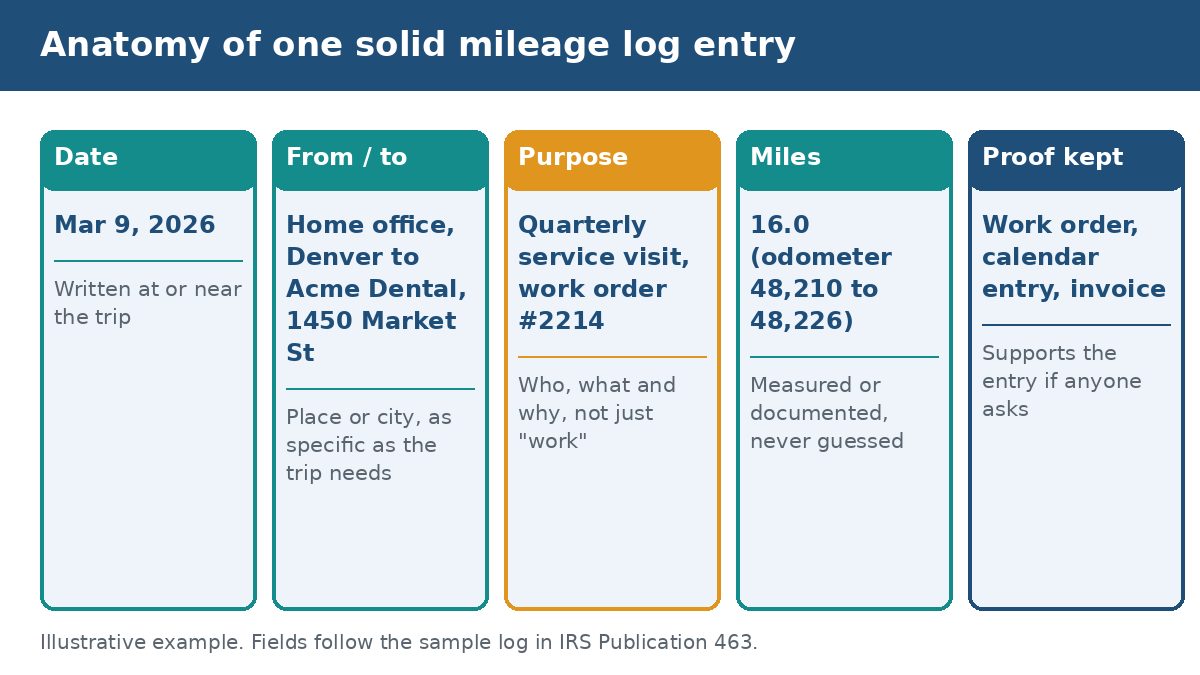
Most weak logs fail on the same two fields: the business purpose and the miles. Here is what a weak entry and a strong entry look like.
| Field | Weak entry | Strong entry |
|---|---|---|
| Destination | Client | Riverside Plumbing, 220 Oak Ave, Boise |
| Business purpose | Work | Walk through kitchen remodel with the owner, signed estimate #118 |
| Business purpose | Errand | Picked up tile order for the Alvarez bathroom job from the supplier |
| Miles | About 20 | 19.4, from odometer 62,310 to 62,329.4 |
| Date | Sometime in May | 2026-05-14 |
The test is simple. Could a stranger read the entry and tell why the drive was for business? If not, add the who and the what. If a detail is confidential, Publication 463 says you do not have to write it in the log, but you do have to record it elsewhere at or near the time and be able to produce it.
Where to get the miles
Odometer readings are the most direct way to show distance, and they also let you show your total yearly miles. A map route gives you a distance for a trip, and it is a reasonable way to fill in the miles when you did not read the odometer. Whichever you use, use it the same way every time and keep the source. A map shows the length of a route. It does not show that you drove it on a given day, which is why the date and the proof matter.
Also write down the year’s total miles
Note the odometer reading on January 1 and December 31. The difference is your total miles for the year, and the business share is easier to explain when both numbers sit next to each other. The printable PDF has a spot for both readings.
Business, commute or personal: which drives count
Only business trips earn the business rate. The sorting matters most for two kinds of drives.
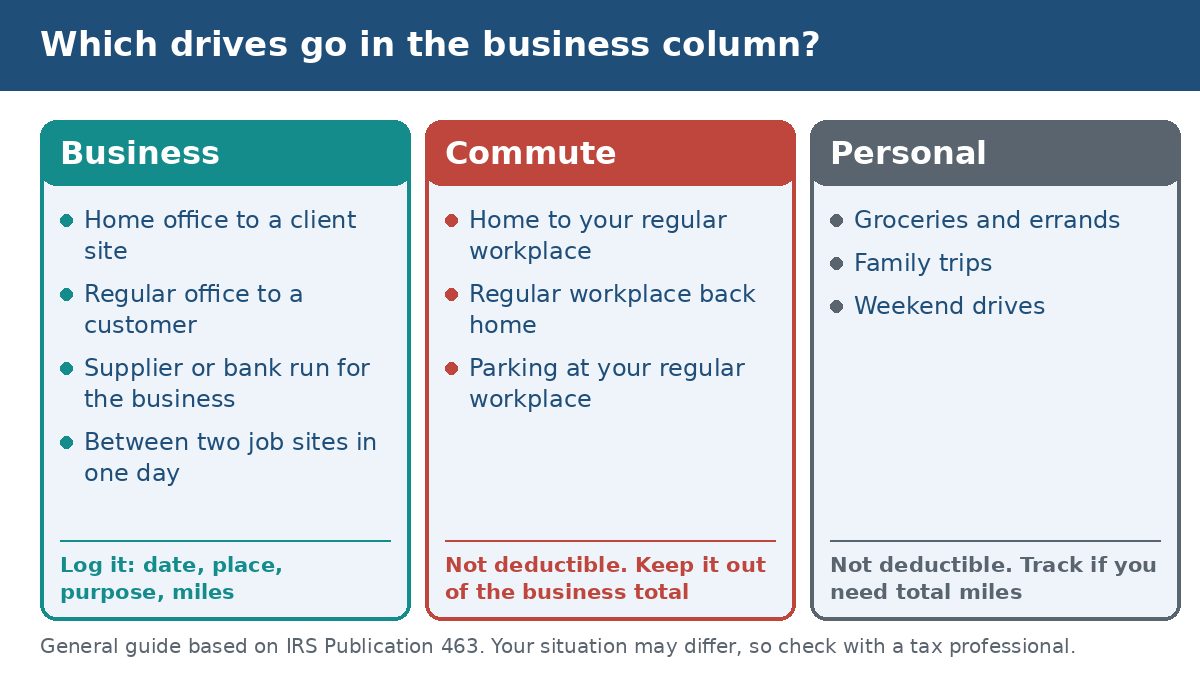
- Commuting. Publication 463 says you cannot deduct the cost of driving between your home and your regular place of work, no matter how far it is. Parking fees at your regular place of work are also nondeductible commuting costs.
- Trips between business stops. Driving from one business location to another, or from your office to a customer, is the kind of trip a business log is for.
- Home office. If your home is your principal place of business, the rules for trips from home change. Publication 463 covers this under local transportation. A tax professional can confirm how it applies to you.
The templates have a trip type column so commute and personal drives can sit in the same log without mixing into your business total. That helps when you want to show business use as a share of all driving.
The 2026 standard mileage rates, with the math
The IRS set two business rates for 2026. The rate depends on the date of the trip.
| Purpose | Jan 1 to Jun 30, 2026 | Jul 1 to Dec 31, 2026 |
|---|---|---|
| Business | 72.5 cents per mile | 76 cents per mile |
| Medical or military moving | 20.5 cents per mile | 23.5 cents per mile |
| Charity | 14 cents per mile | 14 cents per mile |
Because the business rate changed mid-year, one flat rate for all of 2026 will give you the wrong total. Split your miles by date, then multiply each part by its own rate.
Example. Suppose you drove 1,200 business miles from January through June and 1,500 business miles from July through December.
- 1,200 miles x $0.725 = $870.00
- 1,500 miles x $0.76 = $1,140.00
- Total standard mileage deduction value: $2,010.00
The spreadsheet does this for you. It reads the trip date, compares it with the rate change date on the Settings tab, and applies the right rate to each row. If the IRS changes a rate, edit the yellow cells on the Settings tab.
Formulas if you want to build your own
In Excel or Google Sheets, put the trip date in column A, the miles in column B, the January rate in cell F1, the July rate in F2 and the change date in F3. The deduction value in column C is:
=IF(A2>=$F$3, B2*$F$2, B2*$F$1)
To add up the business miles in column B when column D says “Business”:
=SUMIFS(B:B, D:D, "Business")
What the standard rate already covers
If you use the standard mileage rate for a year, you cannot also deduct your actual car expenses for that year. The IRS lists depreciation, lease payments, maintenance and repairs, gasoline, oil, insurance and registration fees as covered by the rate. You can still deduct business parking fees and tolls on top of it. That is why the templates track tolls and parking in their own columns.
A few other rules from Publication 463 are worth knowing before you choose the standard rate. For a car you own, you generally must choose it in the first year the car is available for business use. You cannot use it if you operate five or more cars at the same time, such as in fleet operations. A tax professional can tell you whether the standard rate or actual expenses fits your situation better.
Filled-in examples by type of work
These rows are made up to show the level of detail that works. They are examples, not a template for what your own driving should look like. Your log should only contain trips you made.
Self-employed tradesperson
| Date | From and to | Purpose | Miles |
|---|---|---|---|
| Mar 3 | Shop to 412 Elm St | Install water heater for Chen, job #301 | 14.2 |
| Mar 3 | 412 Elm St to Pipe Supply Co. | Pick up replacement valve for job #301 | 6.8 |
| Mar 4 | Shop to 88 Cedar Ct | Estimate for bathroom repipe, Ortiz | 9.5 |
Real estate agent
| Date | From and to | Purpose | Miles |
|---|---|---|---|
| Apr 11 | Office to 1550 Ridge Rd | Showing for buyer client Patel, three listings that day | 12.3 |
| Apr 11 | 1550 Ridge Rd to 90 Lake Dr | Second showing for Patel | 5.1 |
| Apr 12 | Office to title company, 300 Main St | Closing for the Nguyen sale | 7.4 |
Rideshare or delivery driver
Drivers have a different problem: many short trips a day. Keep the platform’s trip data as support, and add the miles you drove between trips and to and from your first pickup if they count as business under the rules that apply to you. Record the total for the shift in the log with the date, the platform and the odometer readings at the start and end of the shift.
| Date | Shift | Purpose | Odometer | Miles |
|---|---|---|---|---|
| Jun 6 | 5 pm to 11 pm | Delivery shift, food delivery app (trip report saved) | 31,040 to 31,126 | 86.0 |
Sales rep on a set route
Publication 463 gives the sales representative on an established route as its example of a case where the purpose is clear from the circumstances. Record the route length once, then the date of each trip, plus the year’s total miles. Keep proof of the dates, such as call reports or delivery records.
Paper, spreadsheet, app or generator: which log method fits
The IRS accepts a written record, and a computer record counts as written. The right method is the one you will keep up. Here is how the options compare in practice.
| Method | Strength | Watch out for |
|---|---|---|
| Paper log in the car | Fast to write at the stop. Nothing to charge or install. | Easy to lose. You have to add up the totals yourself. |
| Spreadsheet | Totals itself. Searchable. Easy to back up. | Only as timely as you make it. Entries written from memory months later are weak. |
| GPS tracking app | Captures drives automatically. | You still classify each trip and write the purpose. Check it against what actually happened. |
| Log generator | Builds a full-period log from your real driving patterns in minutes. | Only as accurate as the patterns you enter. You must review and correct it. |
Whatever you choose, the log should describe driving that really happened. The tools are there to organize your records, not to replace them.
How ExpressMileage builds a mileage log
ExpressMileage is a mileage log generator. It is useful when you drive in a pattern, or when you need a clean log for a full year or a custom date range and want to build it in minutes instead of by hand. According to the ExpressMileage help center, the process has four steps.
- Start simple. A short interview collects the details that frame your log.
- Autopopulate. You describe the drives you make, and Autopopulate builds log entries for the whole period. It has two modes. Randomize varies the number of drives and distances based on your driving habits, which suits work like rideshare or real estate. Repeating fits regular routes, such as a delivery driver who follows the same route every day.
- Tweak your log. Use the calendar tool to add, change or delete entries. Daily, weekly or monthly repeating drives are easy to set up.
- Download or print. Download the finished log as a PDF or an XLS spreadsheet, and edit the spreadsheet if you need to.
It also separates Business, Personal and Personal Commute drives, so commutes stay out of your business total. You can choose kilometers or miles when you set up your account and change it later.
One thing to be clear about: a generated log is only as accurate as what you tell it. Use it to turn your real driving habits into an organized record, then check the entries against your calendar, invoices and receipts, and correct anything that does not match what you actually drove. Do not add trips that did not happen, and do not aim for a target number.
Start a mileage log with ExpressMileage, or read the step-by-step guide to how ExpressMileage works.
If your log has gaps
Missing days happen. Do not fill them from memory with round numbers, because the IRS says you cannot deduct amounts you approximate or estimate. Instead, rebuild what you can from real evidence: calendar entries, client emails, invoices, delivery records and service receipts that show odometer readings. Keep a note of the source for every rebuilt entry, and mark the log as reconstructed. For a step-by-step approach, see what to do if you did not track mileage. Publication 463 also has rules for records lost in events beyond your control, such as a fire or flood.
Common mistakes to avoid
- Vague purposes. “Work” or “meeting” tells a reader nothing. Name the client, site or errand.
- Rounded or guessed miles. Use the odometer or a documented distance.
- Counting the commute. Home to your regular workplace is not business mileage.
- One rate for all of 2026. The business rate changed on July 1.
- Double counting expenses. Do not deduct gas and repairs on top of the standard rate.
- Writing it all at year end. Weekly entries are timely. Entries written from memory months later are weak.
- Mixing vehicles. Keep a separate log for each vehicle.
- No proof behind the entry. Keep the invoice, work order or calendar entry that supports each trip.
For a pre-filing review, use the evidence-first mileage log checklist. For the tax-return side, see claiming business mileage on your 2026 taxes. If you want the older Excel-only version of a template, there is also a free Excel mileage log template and a page of printable mileage log templates.
A note for Canadian drivers
The Canada Revenue Agency has its own rules. Its guidance says the best evidence is a logbook of business travel kept for the entire year, with the date, destination, purpose and kilometres for each business trip. You should also keep a record of the total kilometres you drive and record the odometer at the start and end of the fiscal period. The CRA also describes a simplified logbook option that uses a three-month sample after a full base year. See the CRA’s motor vehicle records page, linked below, for the details and conditions. The ExpressMileage templates here use miles. ExpressMileage’s generator supports kilometres.
Frequently asked questions
Is this mileage log template free?
Yes. Both the Excel and Google Sheets file and the printable PDF are free to download, with no sign-up.
Does the IRS require a mileage log?
The IRS requires you to substantiate vehicle expenses with adequate records or sufficient evidence. For business driving, a mileage log is the standard way to do that. It needs the date, the place, the business purpose and the miles for each trip.
Can I use Google Sheets or Excel as my mileage log?
Yes. Publication 463 says a record prepared on a computer is considered an adequate record. What matters is that the entries are accurate and kept at or near the time of the trips.
Do I have to record odometer readings?
The IRS sample log in Publication 463 includes odometer start and stop columns, and odometer readings make your miles easy to check. If you use a different way to measure distance, use it consistently and keep the source.
How often should I update my log?
Updating it weekly is enough for the log to be considered timely under Publication 463. Writing each trip as it happens is easier than catching up later.
What is the 2026 IRS mileage rate for business?
72.5 cents per mile from January 1 through June 30, 2026, and 76 cents per mile from July 1 through December 31, 2026.
Is my drive from home to work deductible?
Generally no. Publication 463 treats driving between your home and your regular place of work as commuting, which you cannot deduct. Trips between business locations are different.
Can I deduct gas as well as the standard mileage rate?
No. The standard mileage rate already includes gasoline, maintenance, insurance, depreciation and similar vehicle costs. Business tolls and parking can be added.
How long should I keep my mileage log?
Publication 463 says to keep records that support a deduction for 3 years from the date you file the return that claims it. Ask a tax professional whether a longer period applies to you.
Can I rebuild a mileage log at the end of the year?
You can rebuild a log from real evidence such as calendar entries, invoices and receipts. A record kept at the time is stronger, and you cannot deduct estimated amounts. Do not invent trips.
Can ExpressMileage create a log for me?
Yes. ExpressMileage builds a log from the driving patterns you enter and lets you edit it in a calendar, then you download a PDF or XLS. Review every entry against your real driving before you rely on it.
Related Information
- IRS: Standard mileage rates (2026 rates, IR-2026-29)
- IRS Publication 463, Travel, Gift, and Car Expenses (recordkeeping, commuting, standard mileage rate rules, sample log)
- IRS Topic no. 510, Business use of car
- Canada Revenue Agency: Motor vehicle records
- ExpressMileage FAQs (Autopopulate, drive types, formats)